APPLICATION OF AI
infusing intelligence into enterprise
How AI was designed into two enterprise systems, the WaveLinx CORE diagnostic platform and the Light ARchitect design tool. To shift facility managers and lighting agents from reactive responders into empowered decision-makers and eliminate the expertise gap that stalled lighting agents mid-project.

ROLE
Lead / Principal Enterprise Designer
PLATFORM
Enterprise | IoT | SaaS
PLATFORM
Mobile + Desktop
SCOPE
Research → Delivery
TEAM SIZE
15 Cross-functional
DESIGNED
2025-2026 - Figma
01
CONTENT
DIAGNOSTIC DASHBOARD -What THIS PROJECT IS ABOUT
This case study covers two AI integration workstreams within the WaveLinx CORE and Light ARchitect platforms, both part of a broader initiative to bring meaningful intelligence into Cooper Lighting's enterprise software ecosystem. The work was developed
during a cross-functional AI Hackathon at the Mississauga hub and subsequently evolved into product strategy.
The core design challenge was not "how do we add AI?" but rather: where does AI reduce genuine cognitive burden, and where
does it create noise? Every feature in this case study was designed to answer that question through user research, rapid prototyping, and ruthless prioritization.
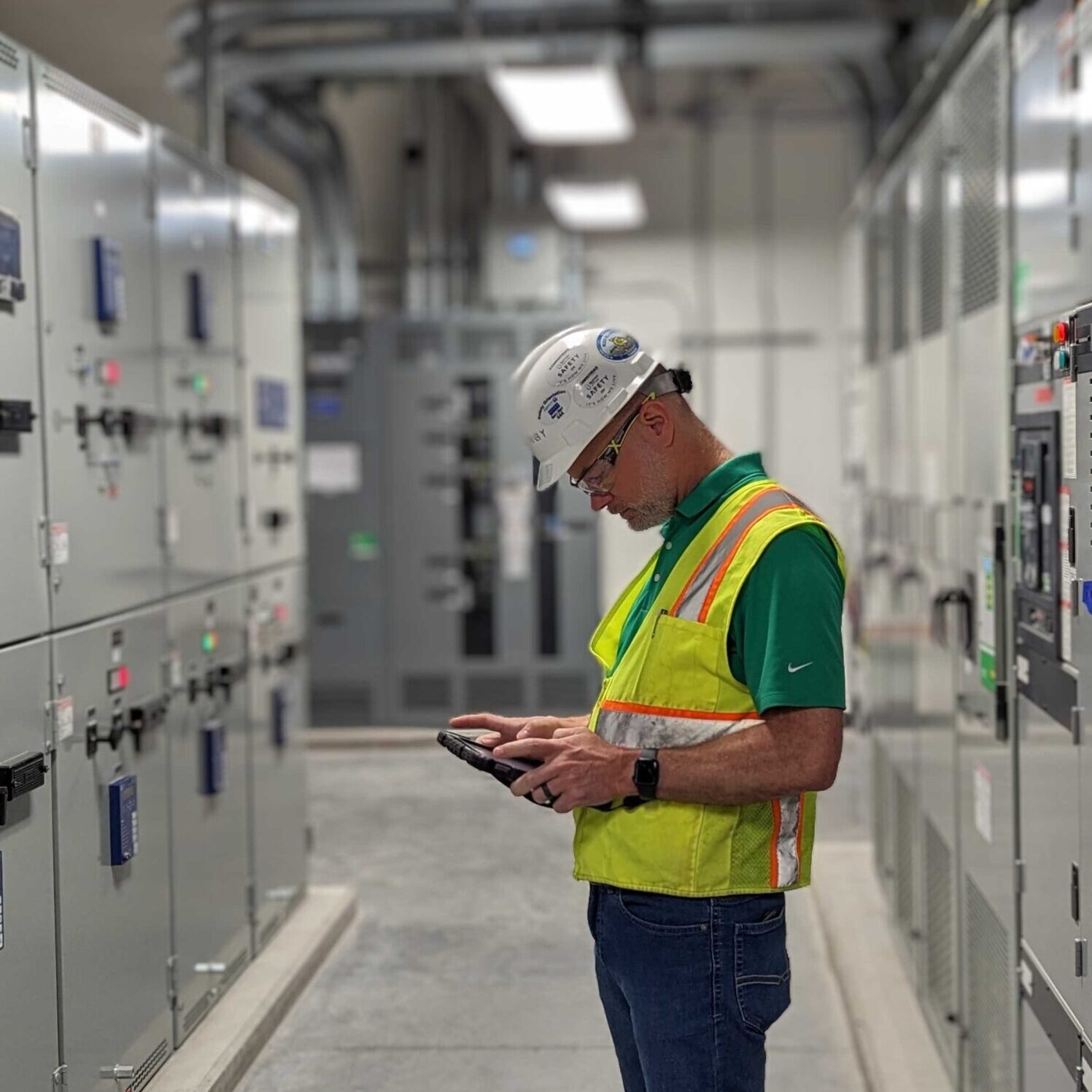
COMMISSIONING TIME
It is going to be a LONG WEEK!
ALARMS
I need to pinpoint and find PROBLEMS NOW!
02
THE CHALLENGE
THE ENTERPRISE AI OPPORTUNITY AND THE TRAP
Adding AI to enterprise software is easy. Adding AI that people actually trust and rely on is genuinely hard. The market pressure in 2024 pushed every software platform toward AI feature announcements — often resulting in bolt-on chatbots and generic suggestions that eroded user confidence rather than building it. My responsibility as design lead was to create a principled AI strategy: identify the moments where machine intelligence could genuinely absorb cognitive load from facility managers and lighting agents, and resist the temptation to AI-wash features that didn't need it.
DESIGN PRINCIPLE
The AI should carry cognitive load, not create it. Every AI-powered feature must reduce the distance between data and decision, not add another layer the user has to learn.
WHERE AI EARNS ITS PLACE
High-volume, low-signal environments where humans can't hold context across hundreds of devices, thousands of data points, or years of product catalogue depth.
WHERE AI GETS IN THE WAY
When it interrupts a confident user mid-task with unsolicited suggestions, or generates recommendations without explainable reasoning the user can verify.
03
DISCOVERY
UNDERSTANDING THE USER
WaveLinx CORE serves two distinct user groups with fundamentally different relationships to the system. Both groups were part of the research phase through interviews, contextual inquiry, and workflow analysis.
01 - FACILITY MANAGERS
Responsible for commercial buildings they cannot fully see. Managing hundreds, sometimes thousands, of devices across multiple floors, around the clock. Their core challenge isn't negligence: it's the impossibility of maintaining awareness at scale. Problems compound quietly until they fail visibly.
02 - LIGHTING AGENTS (CLS / C&I)
Sales and design agents who use Light ARchitect to specify and design commercial lighting projects. They navigate a fixture catalogue spanning thousands of SKUs and 5,000+ IES files, a depth that routinely exceeds any individual's product knowledge. The cost of a wrong spec is measured in project delays and margin erosion.
400+
Connected devices per facility, typical setup
5000
IES (configuration) files in a single fixture family
300
Active alarms in a sample enterprise environment during research
6+
Fixture product families with overlapping visual and spec profiles
04
DESIGN PROCESS
FROM HACKATHON TO PRODUCT STRATEGY
The AI features originated in a structured hackathon format at the Mississauga innovation hub. The process moved from rapid ideation to working prototype to product-level design system integration.
01

DISCOVERY
AI opportunity mapping across the product surface
Conducted a systematic audit of every workflow in CORE and Light ARchitect to identify where users experienced high cognitive load, repetitive decision-making, or expertise gaps. Synthesized findings into a prioritized AI opportunity matrix, distinguishing high-value interventions from low-value noise.
02

CONCEPT SPRINT
AI Hackathon — rapid prototyping and concept validation
Led the UX direction for the CLS AI Hackathon, producing high-fidelity Figma prototypes for three AI-powered features: the Diagnostic Dashboard with intelligent pills, the Predictive Maintenance module, and the Light ARchitect Fixture Recommendation panel. Prototypes were demoed to product stakeholders and leadership within a two-day sprint.
03

ITERATION
Defining the AI interaction model
Worked through a core design tension: AI that surfaces recommendations must feel trustworthy, not presumptuous. Iterated on how the system communicates confidence levels, explains its reasoning, and preserves user authority. Key outcome: every AI action has a human decision point, the system recommends, the user acts.
04

DESIGN SYSTEM ITERATION
AI components into the CLS Design System
Designed and documented reusable AI component patterns, AI search bars, recommendation cards, intelligent pills, predictive alert badges, into the CLS Design System in Figma. This ensured consistent AI interaction language across the product suite and gave engineering a scalable implementation reference.
05
VALIDATION & DELIVERY
Stakeholder validation and product handoff
Presented AI feature prototypes to product leadership and engineering teams. Developed a phased AI roadmap that mapped each feature to technical feasibility and business priority. Delivered annotated Figma specs, interaction flows, and edge case documentation for development handoff.
05
FEATURE DEEP DIVE
DIAGNOSTIC DASHBOARD: AI ASSISTED TROUBLESHOOTING
A reimagined facility management surface that surfaces critical intelligence without requiring navigation — shifting the dashboard from a passive status display into an active decision-support system.
THE PROBLEM
Alert fatigue at scale
In a 400-device commercial lighting environment, the traditional approach puts the entire interpretive burden on the facility manager. A table of 300 alarms is not a dashboard, it's an inbox without rules. The manager must manually triage, categorize, and prioritize every entry, every time.
The result is predictable: critical alerts get buried in noise, reoccurring issues go unaddressed, and offline devices accumulate invisibly until a space fails. The system reports events, but doesn't understand them.
"
"I spend my morning going through alarms I don't understand, trying to figure out which ones actually matter. By the time I've done that, half the day is gone."
— Facility Manager, research interview
BEFORE AI
- Flat alarm list, no triage, no priority signal
- Facility manager interprets "4 years 10 months" device age without context
- Status check requires navigating across multiple screens
- Reoccurring alarms invisible, treated the same as first-time alerts
- No proactive signal, problems surface only after failure
AFTER AI
- Intelligent pills auto-surface Today's Alarms, Critical Alarms, Reoccurring Alarms by urgency and pattern
- AI interprets device age in risk context and surfaces the Recommendation
- Full system health, alarms, controllers, devices, system metrics, on a single screen
- Reoccurring Alarm lens isolates patterns for root cause analysis
- Predictive Maintenance badge signals issues before failure occurs
06
FEATURE DEEP DIVE
optimize system - Self learning configuration
A continuous learning layer that adapts lighting configurations to real occupancy behaviour — replacing set-and-forget commissioning with an AI that updates itself around how the building is actually used.
THE PROBLEM
After commissioning, most lighting systems are set once and
forgotten. Default configurations were designed for an idealized
version of the space, not the patterns of actual occupants. As
people, schedules, and workflows evolve, the lighting falls further out of sync.
Reconfiguring requires a technician visit, a change request, and
specialist knowledge. Most facilities simply don't do it, running on settings that are years out of date.
THE DESIGN SOLUTION
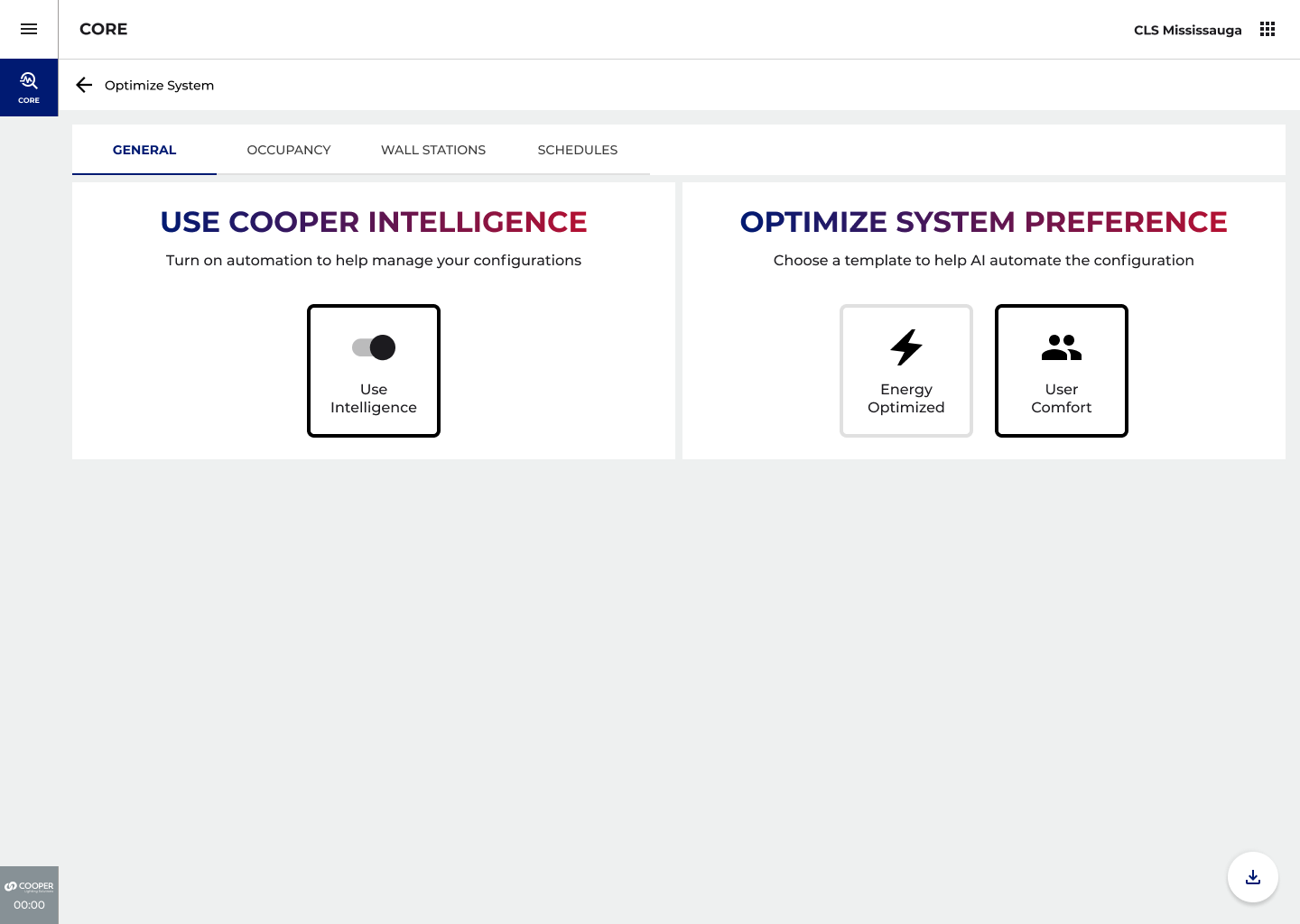
The Optimize System screen presents a single, decisive entry point: Energy Optimized or User Comfort. One choice sets the AI's priority framework for the entire site.
Enabling Cooper Intelligence activates the automation layer across General settings, Occupancy behaviour, Wall Station interactions, and Schedules. The user defines the goal, the system determines how to achieve it.
LEARNING MODEL
A default occupancy light level is set at commissioning: 50%. Over the following days, a user consistently raises the level to 80% using the wall station. Under a User Comfort priority, CORE recognizes this as a meaningful pattern, not an exception, and promotes 80% as the new occupancy default for that space. No change request. No technician. No reconfiguration.
07
DESIGN SOLUTION
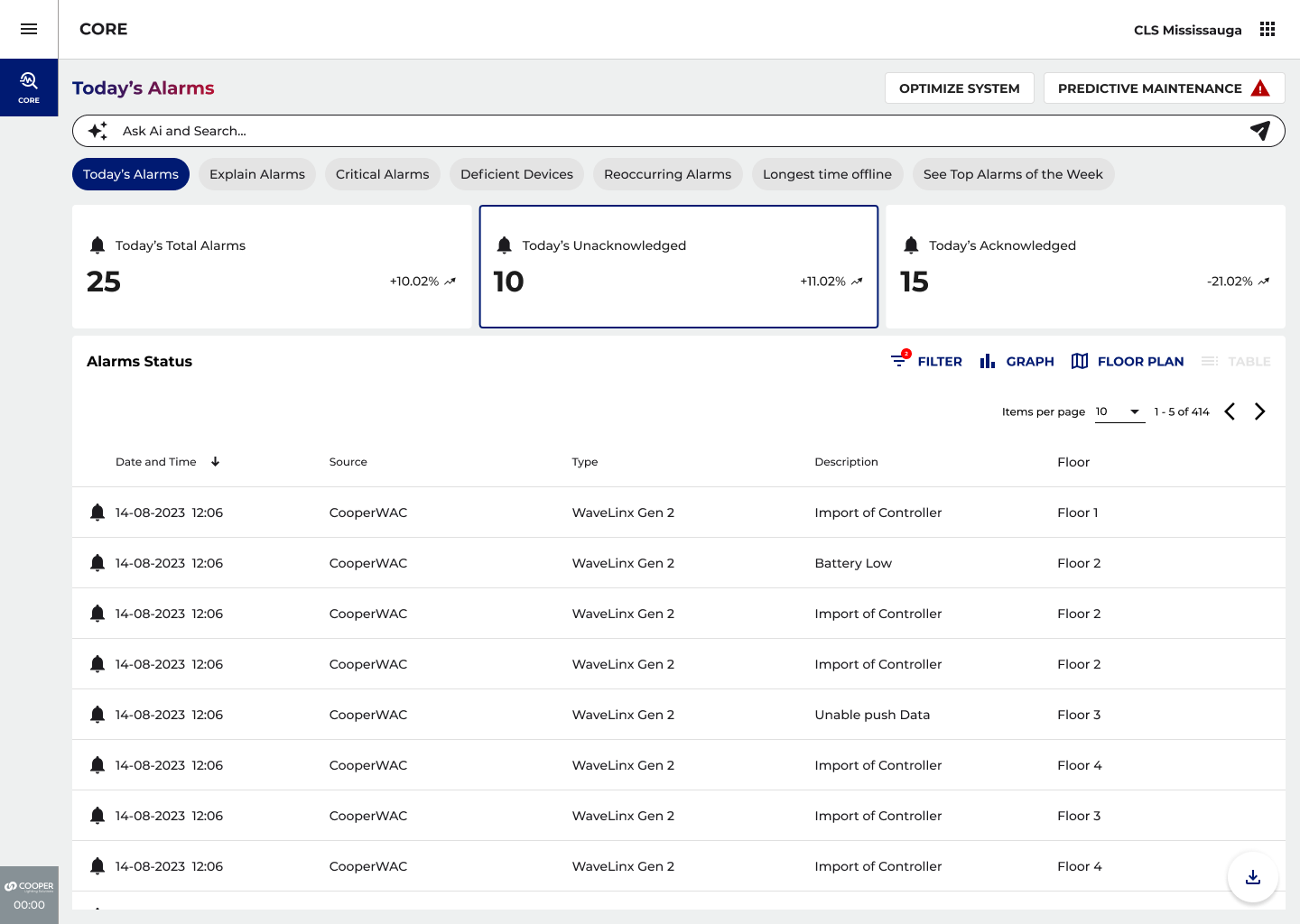
THE DASHBOARD
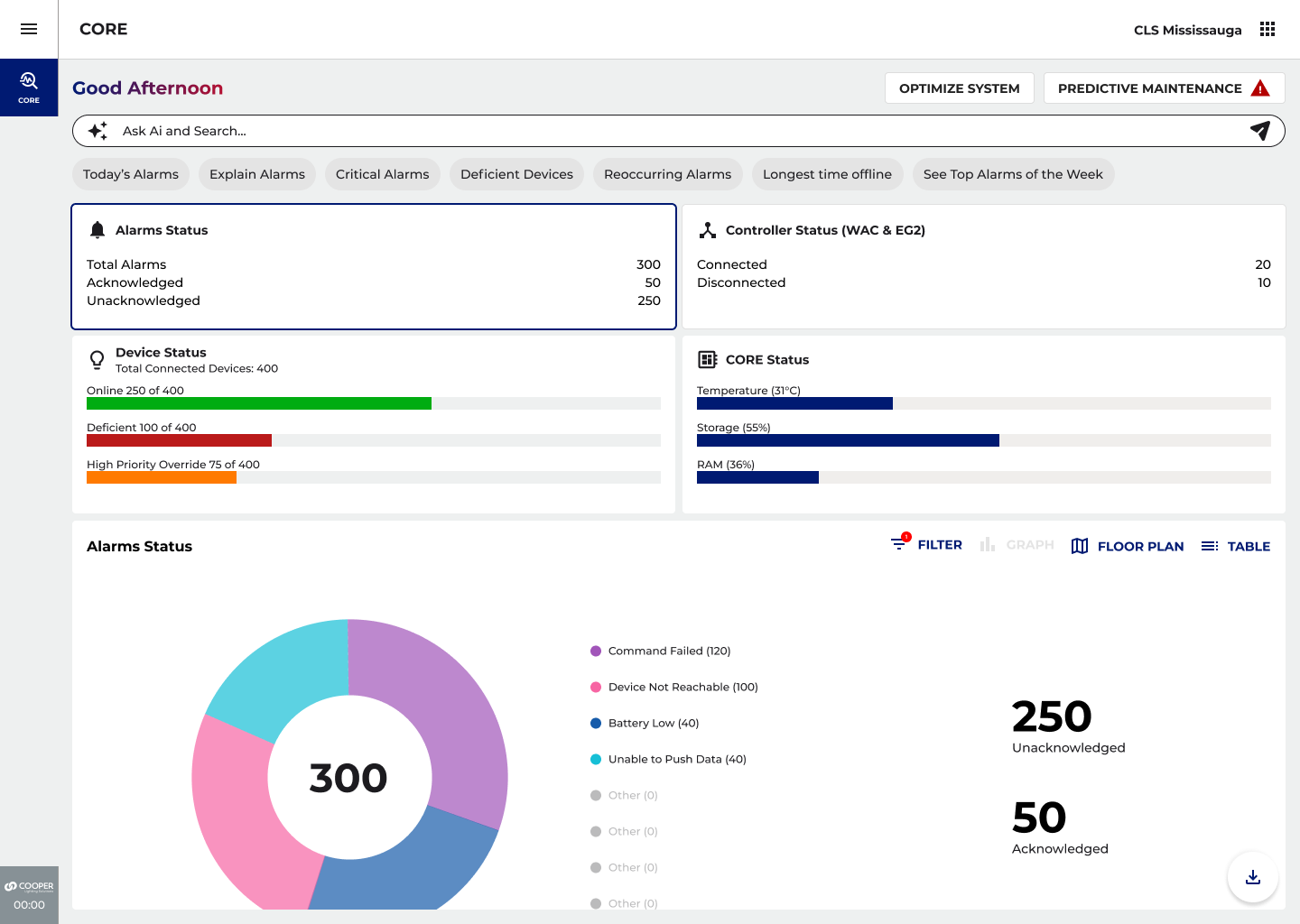
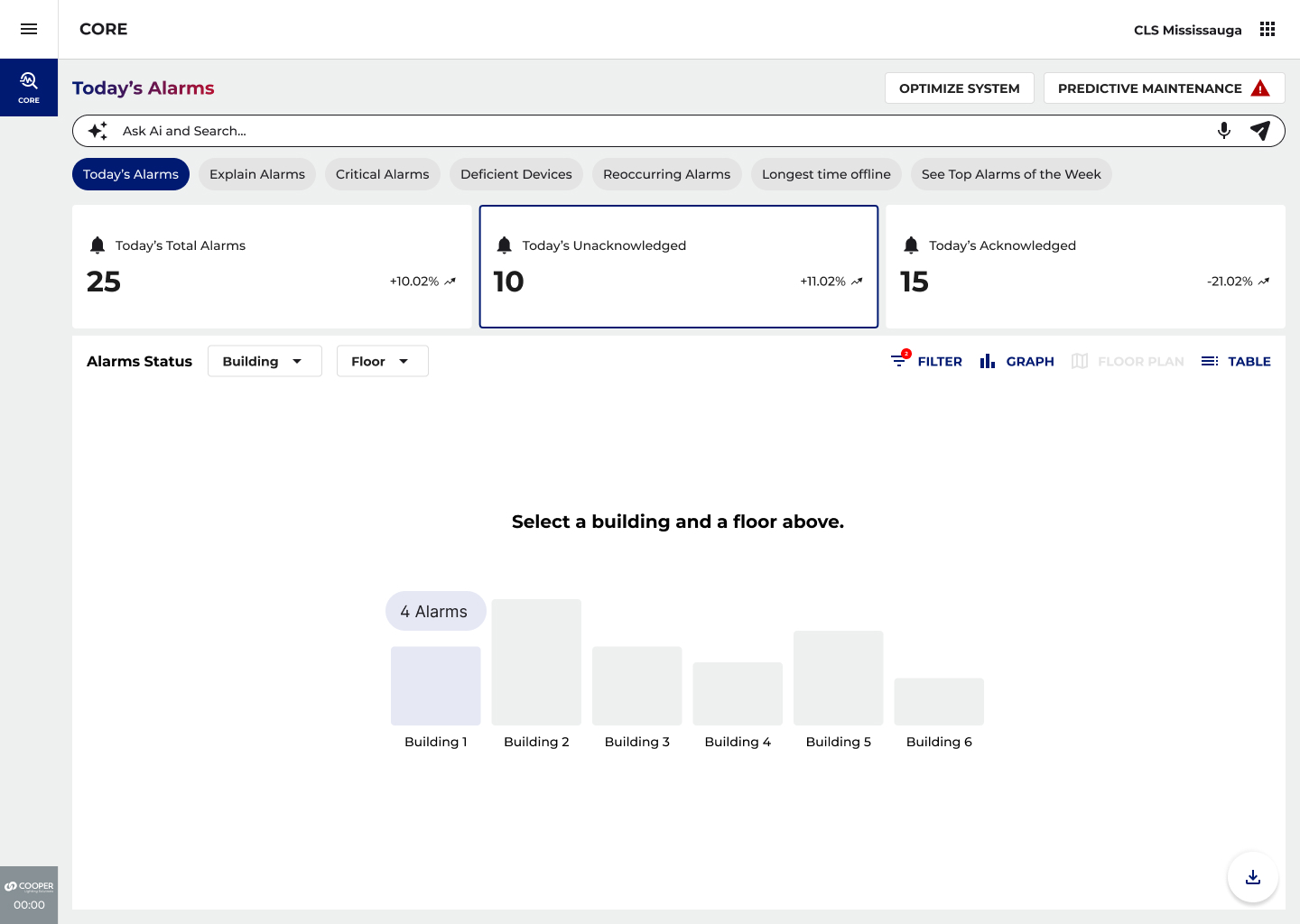
A simulation of the core dashboard UI, illustrating the key AI-powered surface decisions. Annotations\ map to design rationale below.
01
Personalized Greeting
Time-aware context ("Good Afternoon") establishes presence before the first interaction. Signals the system is active and aware, not a static snapshot.
02
AI-Powered Persistent Search
Not a filter, a knowledge surface. The search bar answers natural language queries: troubleshooting guidance, hardware specs, commissioning standards, institutional knowledge. The facility manager never has to leave the dashboard to consult documentation.
03
Intelligent Pills
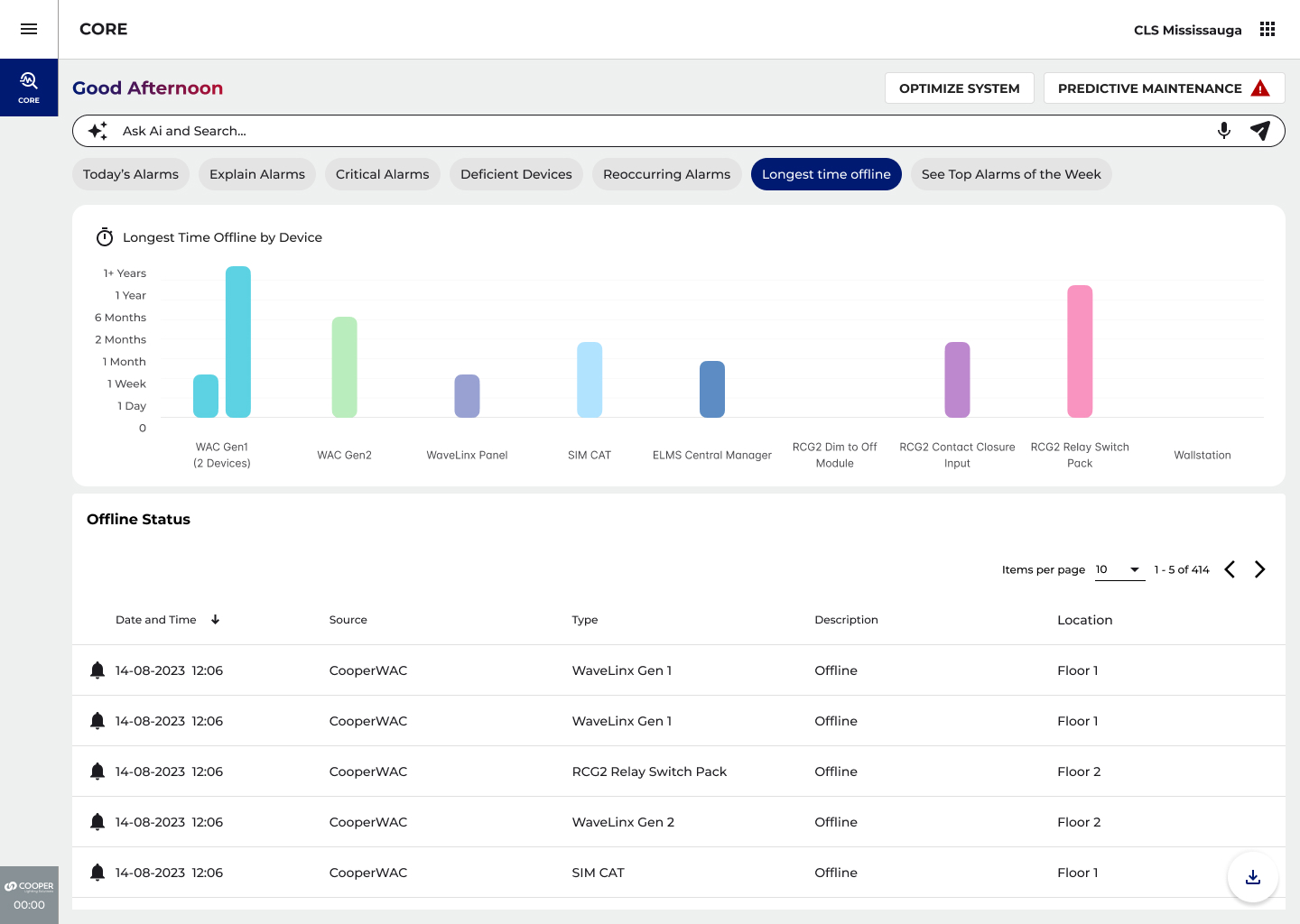
Auto-generated, not user-defined. The AI surfaces Today's Alarms, Critical Alarms, Reoccurring Alarms, Deficient Devices, and Longest Time Offline based on urgency, frequency, and learned patterns. Selecting a pill transforms the dashboard contextually, drilling into a specific diagnostic lens without leaving the screen.
04
Multi-View Pivot
The same data is accessible across Graph, Floor Plan, and Table views without re-querying. Users choose the visualization that matches their decision-making style, spatial thinkers use Floor Plan; data analysts use Table; managers scanning trends use Graph.
05
Full-Surface Health at a Glance
Total alarms, acknowledged vs. unacknowledged, controller connectivity, device status, and real-time CORE system metrics (temperature, storage, RAM), all visible without navigation. The dashboard becomes a genuine command surface.
06
System Health Indicators
CORE temperature, storage, and RAM displayed as persistent context — the facility manager always knows if the platform itself is healthy, independent of device-level alerts.
Explain Alarms
AI-powered alarm interpretation and step-by-step remediation.
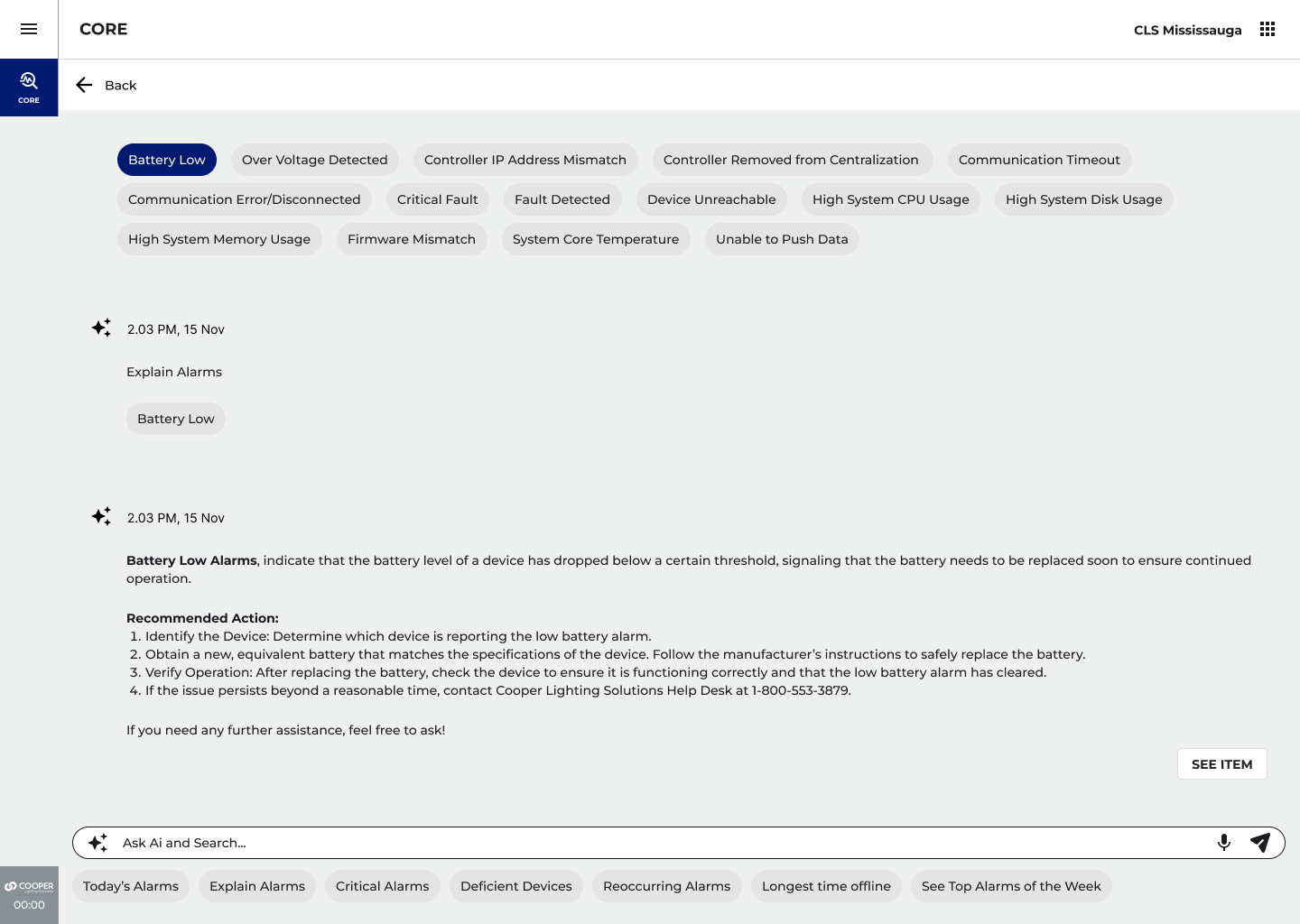
The Explain Alarms lens removes the need for technical interpretation entirely. A facility manager selecting the Battery Low pill receives not just a
definition, but a precise four-step recommended action: identify the device → source the correct replacement battery → verify operation post- replacement → escalate to Cooper Lighting Solutions support if the issue persists.
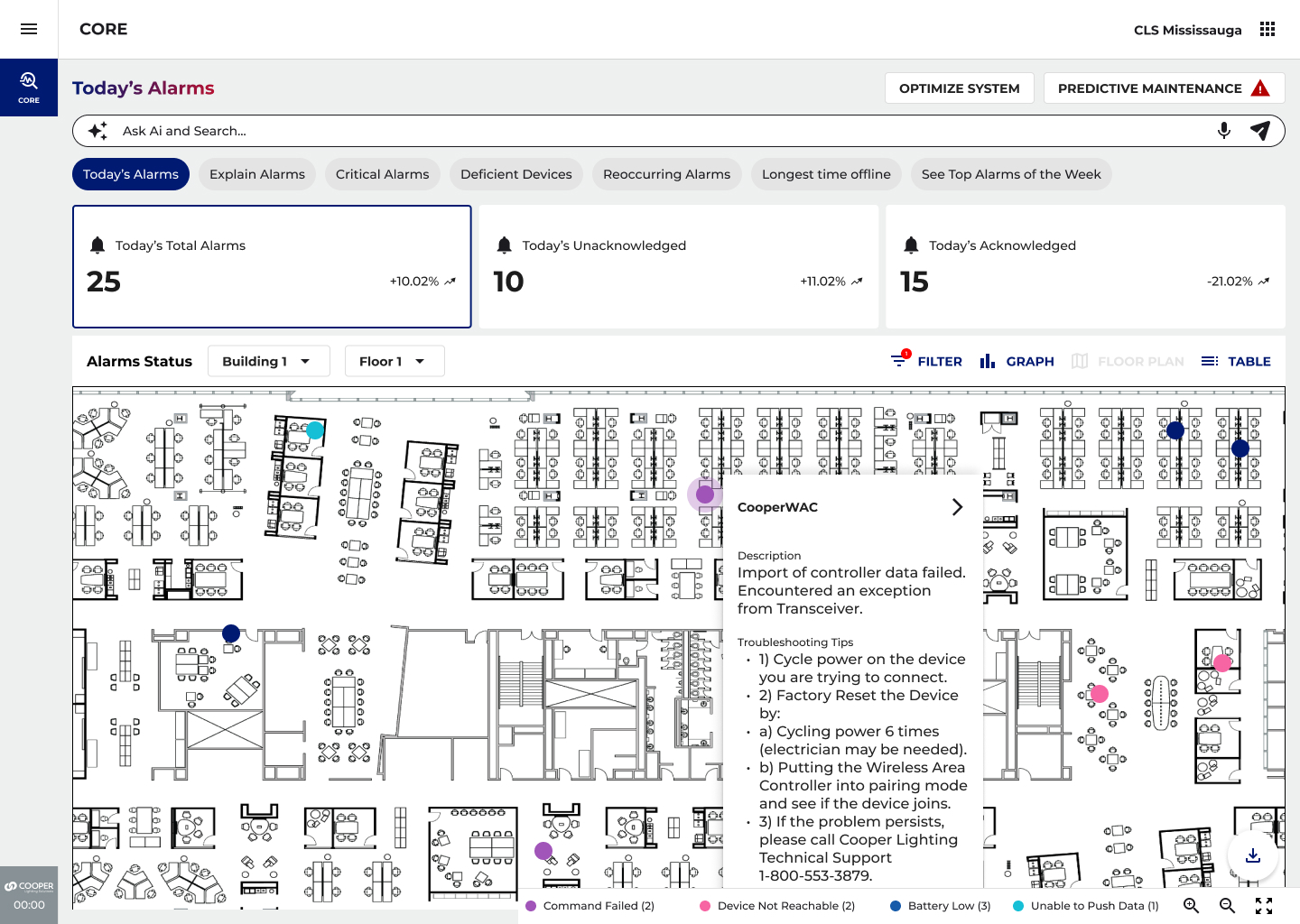
The floor plan view reinforces this spatially, overlaying alarm indicators directly onto the building layout so technicians know exactly where to go before they leave their desk. The AI translates system-level codes into human-readable actions, closing the gap between "something is wrong" and "here's what to do about it."
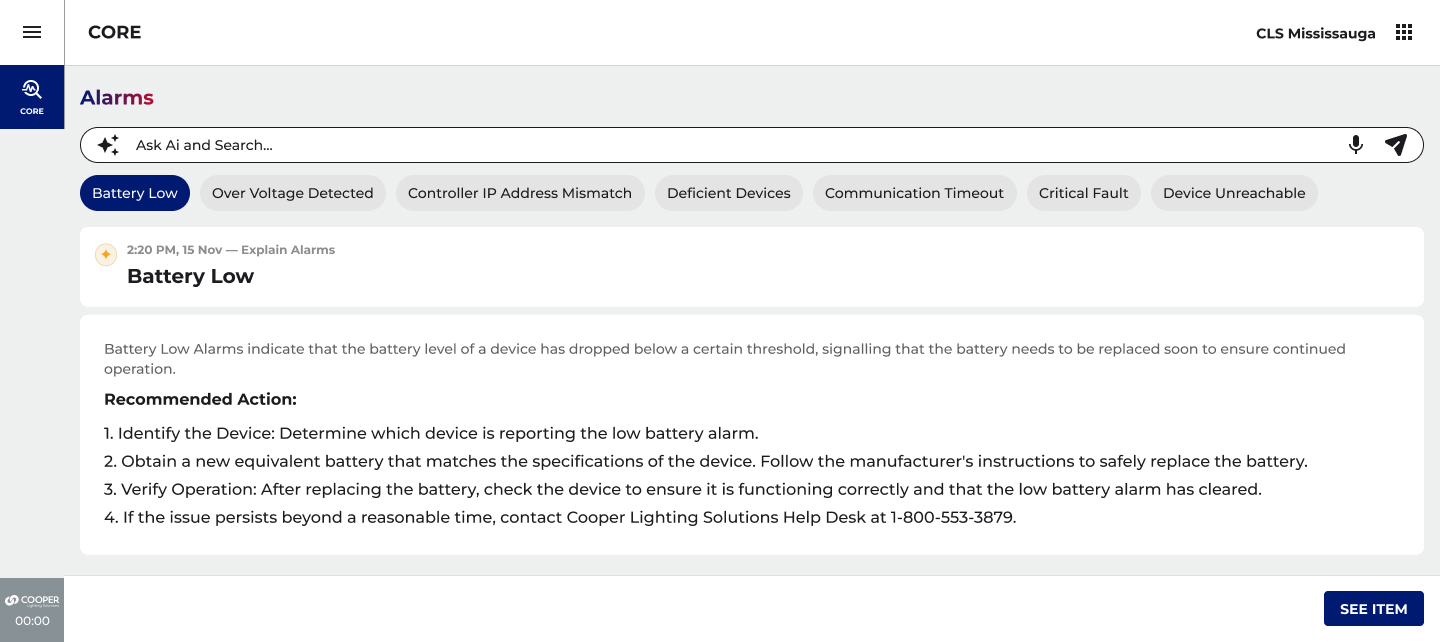
↑ Explain Alarms feature, AI translates a Battery Low alarm code into a 4-step remediation workflow
08
DESIGN SOLUTION
PREDICTIVE MAINTENACE
FROM REACTIVE TO ANTICIPATORY
An AI-powered maintenance layer that continuously monitors device health across the entire building, surfacing devices approaching end-of-life before they fail, and delivering actionable recommendations rather than raw data.
CORE DESIGN INSIGHT
Without AI, this screen is a simple device list, a table of statuses that puts the burden of interpretation on the facility manager. With AI, the system carries that cognitive load instead. The Recommendation button doesn't link to a manual, it hands the facility manager a decision, pre-made and pre-reasoned, ready to act on.
Avg. 5 Year Lifespan
BLE Integrated Sensor Battery
2 Month Window
Remaining before risk escalates, Action Required
4 Signals
AI monitors Age, Firmware, Connectivity, Failure History
Detective → Decision Maker
User Role Shift, AI does the triage
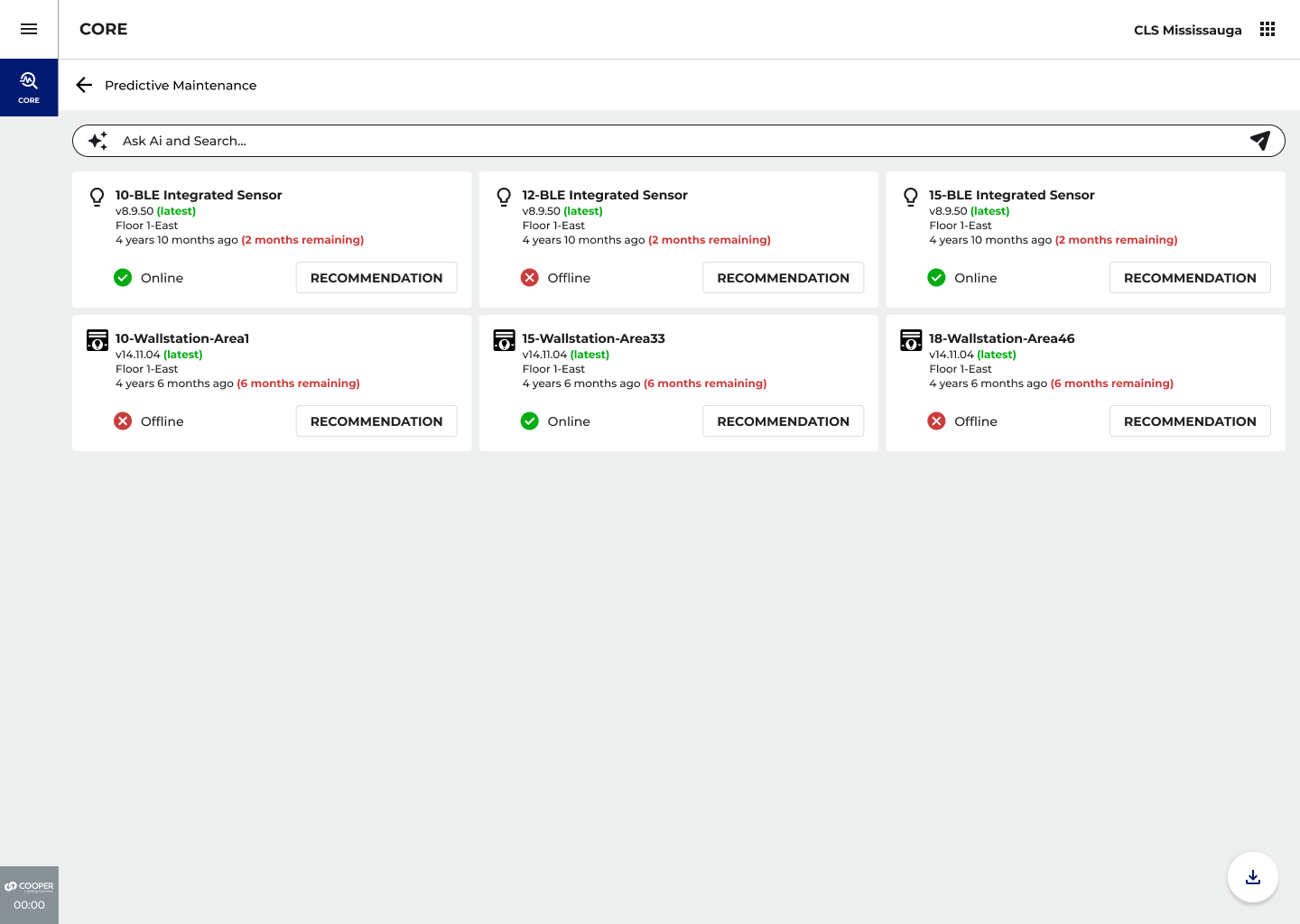
↑ Predictive Maintenance, AI surfaces devices approaching end-of-life with remaining window and direct Recommendation action
THE EMOTIONAL DESIGN GOAL
The user should land on this screen and feel one thing:
"I'm ahead of it."

Not anxious. Not overwhelmed. Ahead of it.
The building is being watched, problems are being caught before they become crises.
The AI does the triage. The human makes the call. Authority stays with the user.
The screen surfaces a small, manageable set of devices that need attention right now, with a clear remaining window before risk escalates.
the shift in user role
Scenario
Before AI
After AI
Device Aging
Manager must know what "4 years 10 months" means in terms of risk
AI translates age to remaining window ("2 months remaining") and generates Recommendation
Reoccurring Alarms
Treated identically to first-time alerts, no pattern detection
Reoccurring Alarms pill isolates patterns; AI distinguishes noise from systemic issues
Offline Devices
Devices accumulate in offline state until manually searched
Longest Time Offline view, ranked bar chart makes the invisible visible instantly
Maintenance Planning
Reactive, respond after failure or physical inspection
Proactive, AI flags upcoming replacements weeks or months in advance
Technical Interpretation
Manager must research alarm codes independently or call support
Explain Alarms delivers plain-language explanation + step-by-step remediation
01
FEATURE DEEP DIVE: LIGHT ARCHITECT
light architect -FIXTURE RECOMMENDATION: NATURAL LANGUAGE SPECIFICATION
An AI-powered recommendation engine that transforms fixture selection from a catalogue-browsing exercise into a guided, context-aware conversation, compressing hours of product research into a focused exchange that ends with a confident, project-specific recommendation.
THE PROBLEM
The Light ARchitect fixture directory spans six product families, Streetworks, McGraw-Edison, Lumark, InVue, Ephesus, HID, each
containing dozens of variants across wattage ranges, mounting types, and programme tiers.
Even within a single family, the visual differences between options are minimal. A user without deep product knowledge has no reliable way to determine which fixture will actually deliver the right photometric outcome for their specific project. Browsing alone cannot answer that question.
Catalogue depth vs user expertise
Agents are expected to know product families they've never specced. The catalogue depth is an asset for expert users, a barrier for everyone else.
Time-to-recommendation
A typical fixture spec decision for a single project type could take hours of cross referencing spec sheets, photometric data, and programme eligibility without AI assistance.
Role-specific context
CLS Agents and C&I Agents have different product access, pricing structures, and programme eligibilities. The same fixture recommendation should not be given to both.
↑ Predictive Maintenance, AI surfaces devices approaching end-of-life with remaining window and direct Recommendation action
01
Role-aware framing
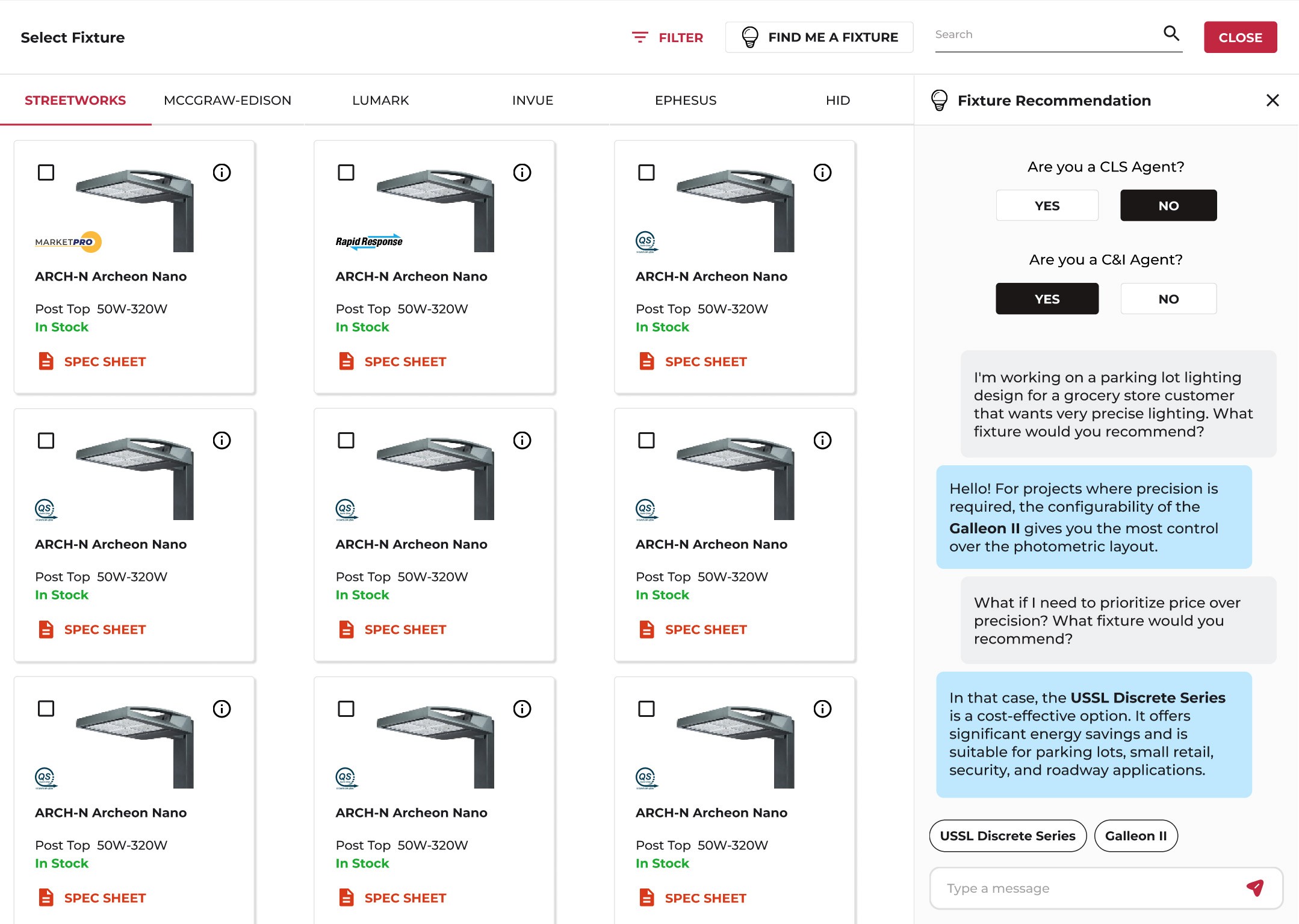
The panel first establishes whether the user is a CLS Agent or C&I Agent before the conversation begins. This allows the AI to tailor recommendations to the appropriate product tiers, pricing structures, and programme eligibilities — ensuring the right fixture for the right user, not just the right application.
02
Natural language input
The user describes their situation in plain language rather than selecting spec filters. This removes the expertise barrier — agents without deep product knowledge can get accurate recommendations immediately.
03
Adaptive recommendations
When the user shifts the requirement from precision to price, the system pivots immediately, recommending the USSL Discrete Series without requiring the user to restart or re-filter.
04
Fixture pills as workflow continuity
The conversation closes with two fixture pills, USSL Discrete Series and Galleon II, surfaced as direct action points. The recommendation becomes the entry point into the next step of the design workflow. No return to the grid required.
02
FEATURE DEEP DIVE: LIGHT ARCHITECT
ai generated ies (config file): 5000 files →One click
An AI-powered IES selection engine that replaces manual file browsing with contextual, requirements-driven generation, making 5,000 photometric files fully leveraged without ever needing to be browsed.
SCALE OF THE PROBLEM
The ARCH Archeon Small fixture family alone contains 5,000 IES files — each representing a unique permutation of CCT,vlumen output, and power draw. Even with filters for colour temperature (3000K / 4000K / 5700K), lumen bands, wattage ranges, and optic type, the user is making technical decisions that require photometric expertise most agents simply don't have. Scrolling is impossible.
THE DESIGN SOLUTION
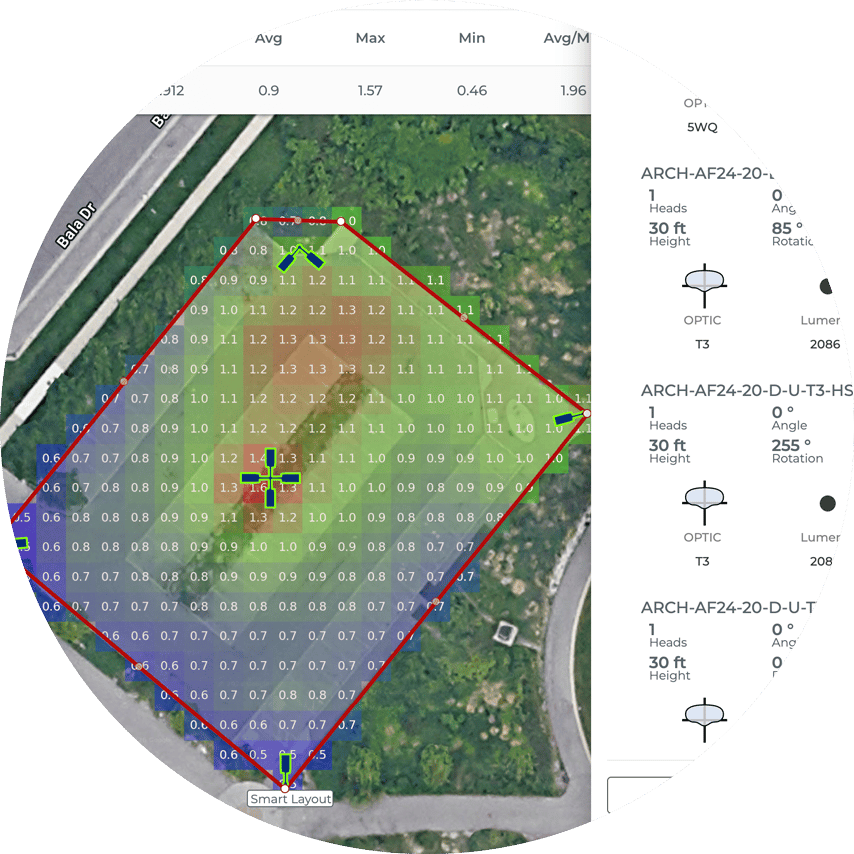
The user works directly on a real map, drawing boundary areas for each zone, Main Customer Parking, Entrance, Side Parking, and placing fixtures at the correct mounting height.
Intelligence lives in the My Requirements panel, where the user defines the outcome rather than the specification: performance preference level, CCT, minimum light level standard, uniformity ratio, and whether house-side shielding is needed.
When the user hits Generate, Light ARchitect maps every requirement to the precise IES file from the library and applies it automatically to each fixture position on the layout.
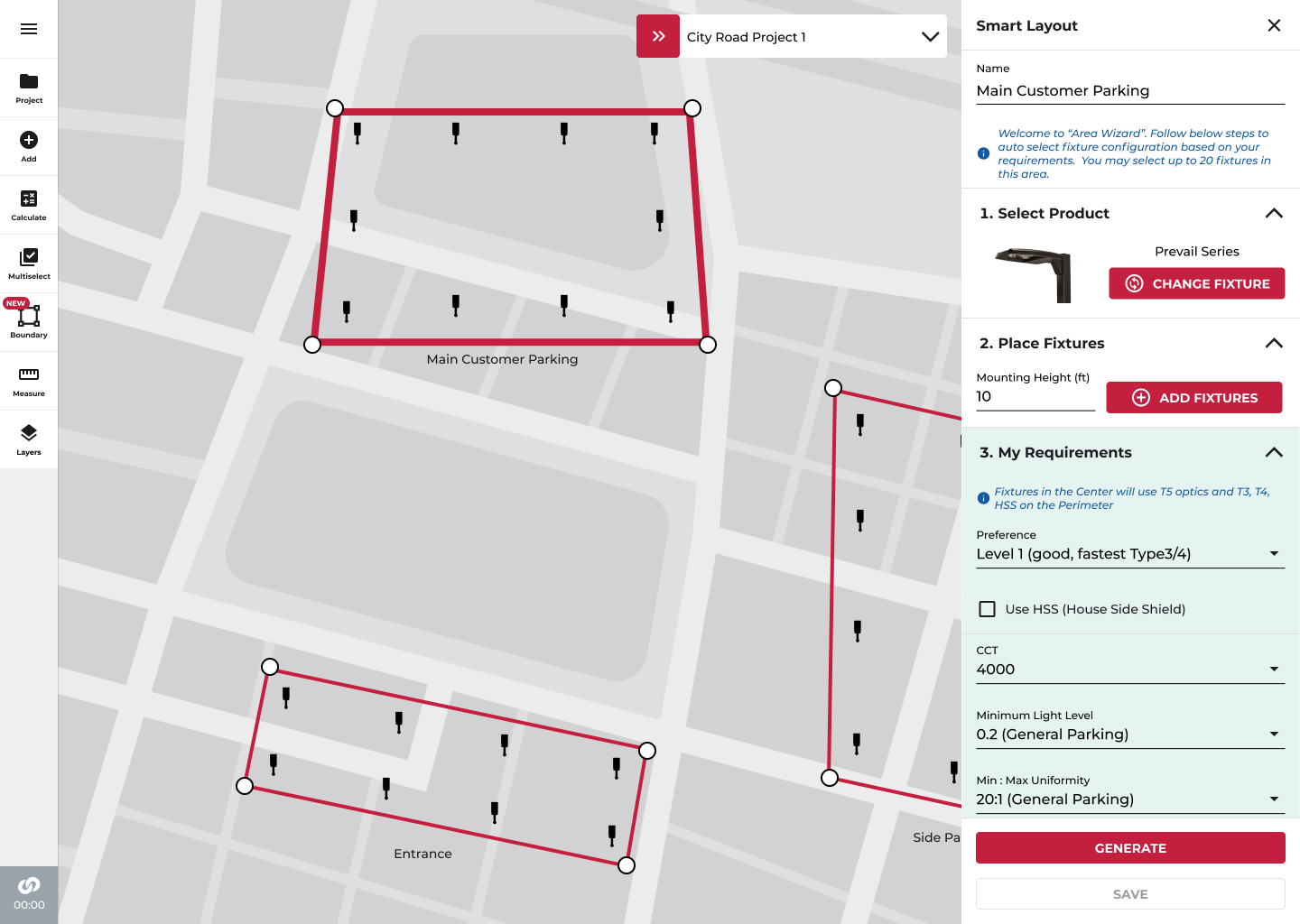
The 5,000-file library doesn't disappear. It becomes the engine running silently underneath, fully leveraged, never browsed.
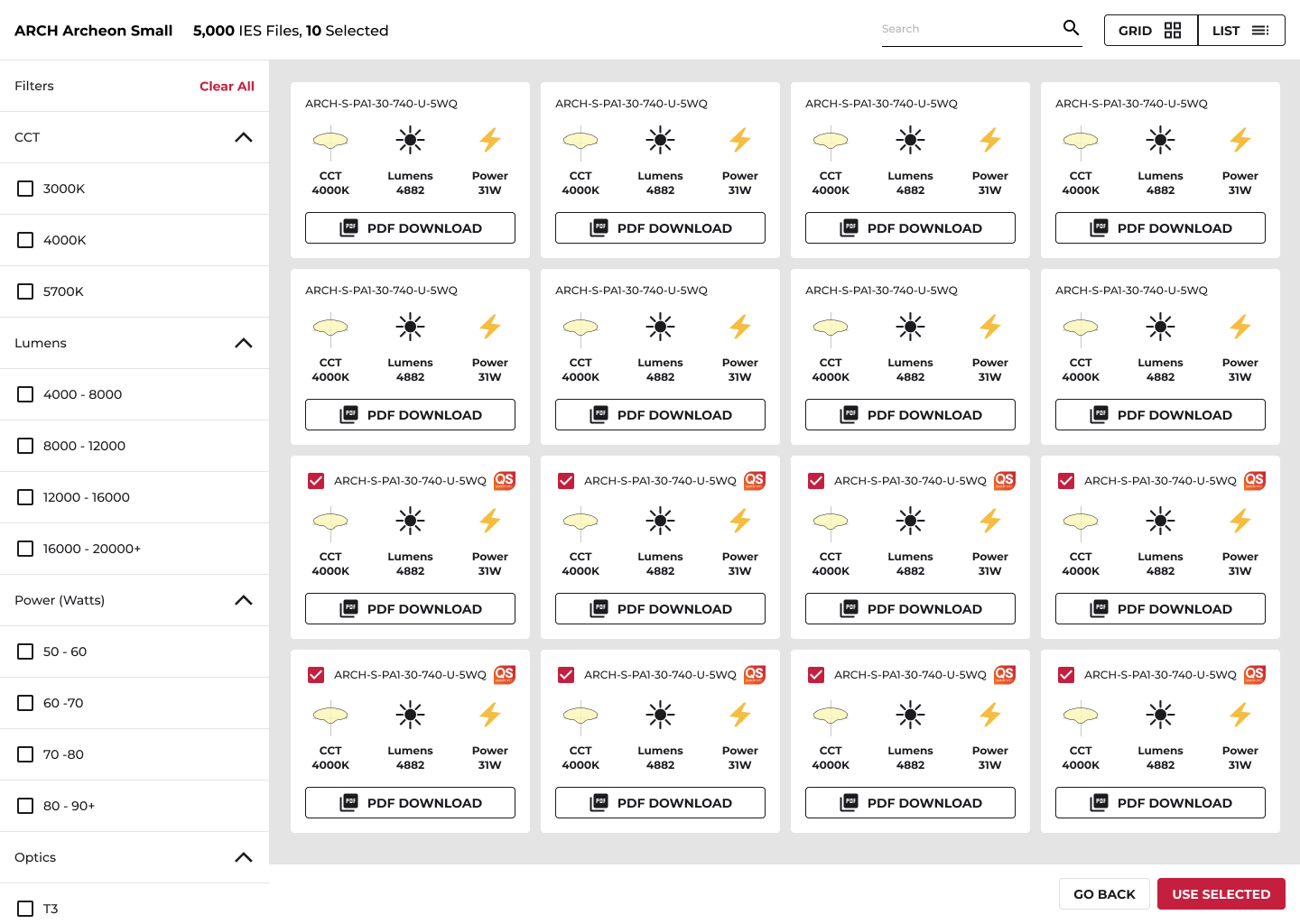
DESIGN IMPACT
For CLS and C&I agents managing multiple concurrent projects across varied site types, this removes one of the most technically demanding and time-consuming steps in the lighting design workflow, replacing thousands of decisions with a single, context-aware generation.
03
FEATURE DEEP DIVE: LIGHT ARCHITECT
WHAT THE AI DESIGN STRATEGY DELIVERED
The AI features were presented to product leadership and engineering teams following the Hackathon sprint. The design work established the product strategy, interaction model, and design system components for AI across the CLS platform.
↓90%
Reduction in IES configuration file selection time
3
AI features shipped accross 2 products
0
Manual reconfigurations needed after optimized AI learns occupancy and product
↓75%
Reduction in daily alarm triage time for facility managers
Time to Specification — Before vs. After AI
Fixture Research (Before)
2–4 hrs
Fixture Research (After AI)
~5 min

IES File Selection (Before)
45–90 min
IES File Selection (After AI)
1 click
Scenario
Before AI
After AI

Shifted the product narrative
From reactive alert management to proactive intelligence — demonstrated through a working prototype and presented at the CLS AI Hackathon
Established a reusable AI interaction model
Recommendation cards, intelligent pills, AI search, and predictive alert badges added to the CLS Design System
Resolved the expertise barrier
In Light ARchitect, agents can now get accurate, role-appropriate fixture and IES recommendations without specialist product knowledge
Designed a self-learning configuration layer
That eliminates manual reconfiguration after occupancy pattern changes, a first for the platform
Delivered full annotated specs and edge case documentation
For three AI features across two products
Time to proposal - Hours to Days
Time to proposal - Minutes
04
REFLECTION
What I learned and what I would push further
Leading the UX strategy for AI integration across two distinct enterprise products in a compressed hackathon format forced clarity about what AI-powered design actually requires.
PRINCIPLE VALIDATED
AI NEEDS A HUMAN DECISION POINT
Every AI recommendation in these features preserves user authority. The system surfaces, the user acts. This wasn't a compromise, it was the design principle that made adoption feel natural rather than threatening. For enterprise users managing regulated environments, "the AI decided" is not acceptable. "The AI recommended, I confirmed" is.
DESIGN CHALLENGE
CALIBRATING AI CONFIDENCE COMMUNICATION
One of the hardest design problems was how to communicate the AI's confidence level without creating anxiety. A recommendation that says "replace this device" needs to feel trustworthy, but not absolute. Future iterations should explore surfacing the reasoning chain so users understand how the AI arrived at its recommendation.
WHAT I WOULD PUSH FURTHER
ROLE-BASED AI PERSONALIZATION AT SCALE
The C&I vs. CLS agent distinction in Light ARchitect demonstrated how much value role-aware AI adds. Extending this to CORE, where a facility manager, a contractor, and a building owner have entirely different information needs, would significantly improve the signal-to-noise ratio for each user type.
BROADER LESSON
THE BEST AI FEATURES ARE INVISIBLE
The Optimize System learning model is the feature I'm proudest of from a design perspective, because it doesn't announce itself. The building just works better over time. The facility manager doesn't see AI; they see a system that understands them. That invisibility is the design goal every AI integration should aim for.
APPLICATION OF AI
infusing intelligence into
enterprise
How AI was designed into two enterprise systems, the WaveLinx CORE diagnostic platform and the Light ARchitect design tool. To shift facility managers and lighting agents from reactive responders into empowered decision-makers and eliminate the expertise gap that stalled lighting agents mid-project.

ROLE
Lead / Principal Enterprise Designer
PLATFORM
Enterprise | IoT | SaaS
PLATFORM
Mobile + Desktop
SCOPE
Research → Delivery
TEAM SIZE
15 Cross-functional
DESIGNED
2025-2026 - Figma
01
CONTENT
DIAGNOSTIC DASHBOARD -What THIS PROJECT IS ABOUT
This case study covers two AI integration workstreams within the WaveLinx CORE and Light ARchitect platforms, both part of a broader initiative to bring meaningful intelligence into Cooper Lighting's enterprise software ecosystem. The work was developed
during a cross-functional AI Hackathon at the Mississauga hub and subsequently evolved into product strategy.
The core design challenge was not "how do we add AI?" but rather: where does AI reduce genuine cognitive burden, and where
does it create noise? Every feature in this case study was designed to answer that question through user research, rapid prototyping, and ruthless prioritization.
COMMISSIONING TIME
It is going to be a LONG WEEK!
ALARMS
I need to pinpoint and find PROBLEMS NOW!
02
THE CHALLENGE
THE ENTERPRISE AI OPPORTUNITY AND THE TRAP
Adding AI to enterprise software is easy. Adding AI that people actually trust and rely on is genuinely hard. The market pressure in 2024 pushed every software platform toward AI feature announcements — often resulting in bolt-on chatbots and generic suggestions that eroded user confidence rather than building it. My responsibility as design lead was to create a principled AI strategy: identify the moments where machine intelligence could genuinely absorb cognitive load from facility managers and lighting agents, and resist the temptation to AI-wash features that didn't need it.
DESIGN PRINCIPLE
The AI should carry cognitive load, not create it. Every AI-powered feature must reduce the distance between data and decision, not add another layer the user has to learn.
WHERE AI EARNS ITS PLACE
High-volume, low-signal environments where humans can't hold context across hundreds of devices, thousands of data points, or years of product catalogue depth.
WHERE AI GETS IN THE WAY
When it interrupts a confident user mid-task with unsolicited suggestions, or generates recommendations without explainable reasoning the user can verify.
03
DISCOVERY
UNDERSTANDING THE USER
WaveLinx CORE serves two distinct user groups with fundamentally different relationships to the system. Both groups were part of the research phase through interviews, contextual inquiry, and workflow analysis.
01 - FACILITY MANAGERS
Responsible for commercial buildings they cannot fully see. Managing hundreds, sometimes thousands, of devices across multiple floors, around the clock. Their core challenge isn't negligence: it's the impossibility of maintaining awareness at scale. Problems compound quietly until they fail visibly.
02 - LIGHTING AGENTS (CLS / C&I)
Sales and design agents who use Light ARchitect to specify and design commercial lighting projects. They navigate a fixture catalogue spanning thousands of SKUs and 5,000+ IES files, a depth that routinely exceeds any individual's product knowledge. The cost of a wrong spec is measured in project delays and margin erosion.
400+
Connected devices per facility, typical setup
5000
IES (configuration) files in a single fixture family
300
Active alarms in a sample enterprise environment during research
6+
Fixture product families with overlapping visual and spec profiles
04
DESIGN PROCESS
FROM HACKATHON TO PRODUCT STRATEGY
The AI features originated in a structured hackathon format at the Mississauga innovation hub. The process moved from rapid ideation to working prototype to product-level design system integration.
01

DISCOVERY
AI opportunity mapping across the product surface
Conducted a systematic audit of every workflow in CORE and Light ARchitect to identify where users experienced high cognitive load, repetitive decision-making, or expertise gaps. Synthesized findings into a prioritized AI opportunity matrix, distinguishing high-value interventions from low-value noise.
02

CONCEPT SPRINT
AI Hackathon — rapid prototyping and concept validation
Led the UX direction for the CLS AI Hackathon, producing high-fidelity Figma prototypes for three AI-powered features: the Diagnostic Dashboard with intelligent pills, the Predictive Maintenance module, and the Light ARchitect Fixture Recommendation panel. Prototypes were demoed to product stakeholders and leadership within a two-day sprint.
03

ITERATION
Defining the AI interaction model
Worked through a core design tension: AI that surfaces recommendations must feel trustworthy, not presumptuous. Iterated on how the system communicates confidence levels, explains its reasoning, and preserves user authority. Key outcome: every AI action has a human decision point, the system recommends, the user acts.
04

DESIGN SYSTEM ITERATION
AI components into the CLS Design System
Designed and documented reusable AI component patterns, AI search bars, recommendation cards, intelligent pills, predictive alert badges, into the CLS Design System in Figma. This ensured consistent AI interaction language across the product suite and gave engineering a scalable implementation reference.
05
VALIDATION & DELIVERY
Stakeholder validation and product handoff
Presented AI feature prototypes to product leadership and engineering teams. Developed a phased AI roadmap that mapped each feature to technical feasibility and business priority. Delivered annotated Figma specs, interaction flows, and edge case documentation for development handoff.
05
FEATURE DEEP DIVE
DIAGNOSTIC DASHBOARD: AI ASSISTED TROUBLESHOOTING
A reimagined facility management surface that surfaces critical intelligence without requiring navigation — shifting the dashboard from a passive status display into an active decision-support system.
THE PROBLEM
Alert fatigue at scale
In a 400-device commercial lighting environment, the traditional approach puts the entire interpretive burden on the facility manager. A table of 300 alarms is not a dashboard, it's an inbox without rules. The manager must manually triage, categorize, and prioritize every entry, every time.
The result is predictable: critical alerts get buried in noise, reoccurring issues go unaddressed, and offline devices accumulate invisibly until a space fails. The system reports events, but doesn't understand them.
"
"I spend my morning going through alarms I don't understand, trying to figure out which ones actually matter. By the time I've done that, half the day is gone."
— Facility Manager, research interview
BEFORE AI
- Flat alarm list, no triage, no priority signal
- Facility manager interprets "4 years 10 months" device age without context
- Status check requires navigating across multiple screens
- Reoccurring alarms invisible, treated the same as first-time alerts
- No proactive signal, problems surface only after failure
AFTER AI
- Intelligent pills auto-surface Today's Alarms, Critical Alarms, Reoccurring Alarms by urgency and pattern
- AI interprets device age in risk context and surfaces the Recommendation
- Full system health, alarms, controllers, devices, system metrics, on a single screen
- Reoccurring Alarm lens isolates patterns for root cause analysis
- Predictive Maintenance badge signals issues before failure occurs
06
FEATURE DEEP DIVE
optimize system - Self learning configuration
A continuous learning layer that adapts lighting configurations to real occupancy behaviour — replacing set-and-forget commissioning with an AI that updates itself around how the building is actually used.
THE PROBLEM
After commissioning, most lighting systems are set once and
forgotten. Default configurations were designed for an idealized
version of the space, not the patterns of actual occupants. As
people, schedules, and workflows evolve, the lighting falls further out of sync.
Reconfiguring requires a technician visit, a change request, and
specialist knowledge. Most facilities simply don't do it, running on settings that are years out of date.
THE DESIGN SOLUTION
The Optimize System screen presents a single, decisive entry point: Energy Optimized or User Comfort. One choice sets the AI's priority framework for the entire site.
Enabling Cooper Intelligence activates the automation layer across General settings, Occupancy behaviour, Wall Station interactions, and Schedules. The user defines the goal, the system determines how to achieve it.
LEARNING MODEL
A default occupancy light level is set at commissioning: 50%. Over the following days, a user consistently raises the level to 80% using the wall station. Under a User Comfort priority, CORE recognizes this as a meaningful pattern, not an exception, and promotes 80% as the new occupancy default for that space. No change request. No technician. No reconfiguration.
07
DESIGN SOLUTION
THE DASHBOARD
A simulation of the core dashboard UI, illustrating the key AI-powered surface decisions. Annotations\ map to design rationale below.
01
Personalized Greeting
Time-aware context ("Good Afternoon") establishes presence before the first interaction. Signals the system is active and aware, not a static snapshot.
02
AI-Powered Persistent Search
Not a filter, a knowledge surface. The search bar answers natural language queries: troubleshooting guidance, hardware specs, commissioning standards, institutional knowledge. The facility manager never has to leave the dashboard to consult documentation.
03
Intelligent Pills
Auto-generated, not user-defined. The AI surfaces Today's Alarms, Critical Alarms, Reoccurring Alarms, Deficient Devices, and Longest Time Offline based on urgency, frequency, and learned patterns. Selecting a pill transforms the dashboard contextually, drilling into a specific diagnostic lens without leaving the screen.
04
Multi-View Pivot
The same data is accessible across Graph, Floor Plan, and Table views without re-querying. Users choose the visualization that matches their decision-making style, spatial thinkers use Floor Plan; data analysts use Table; managers scanning trends use Graph.
05
Full-Surface Health at a Glance
Total alarms, acknowledged vs. unacknowledged, controller connectivity, device status, and real-time CORE system metrics (temperature, storage, RAM), all visible without navigation. The dashboard becomes a genuine command surface.
06
System Health Indicators
CORE temperature, storage, and RAM displayed as persistent context — the facility manager always knows if the platform itself is healthy, independent of device-level alerts.
Explain Alarms
AI-powered alarm interpretation and step-by-step remediation.
The Explain Alarms lens removes the need for technical interpretation entirely. A facility manager selecting the Battery Low pill receives not just a
definition, but a precise four-step recommended action: identify the device → source the correct replacement battery → verify operation post-
replacement → escalate to Cooper Lighting Solutions support if the issue persists.
The floor plan view reinforces this spatially, overlaying alarm indicators directly onto the building layout so technicians know exactly where to go before they leave their desk. The AI translates system-level codes into human-readable actions, closing the gap between "something is wrong" and "here's what to do about it."
↑ Explain Alarms feature, AI translates a Battery Low alarm code into a 4-step remediation workflow
08
DESIGN SOLUTION
PREDICTIVE MAINTENACE
FROM REACTIVE TO ANTICIPATORY
An AI-powered maintenance layer that continuously monitors device health across the entire building, surfacing devices approaching end-of-life before they fail, and delivering actionable recommendations rather than raw data.
CORE DESIGN INSIGHT
Without AI, this screen is a simple device list, a table of statuses that puts the burden of interpretation on the facility manager. With AI, the system carries that cognitive load instead. The Recommendation button doesn't link to a manual, it hands the facility manager a decision, pre-made and pre-reasoned, ready to act on.
Avg. 5 Year Lifespan
BLE Integrated Sensor Battery
2 Month Window
Remaining before risk escalates, Action Required
4 Signals
AI monitors Age, Firmware, Connectivity, Failure History
Detective → Decision Maker
User Role Shift, AI does the triage
↑ Predictive Maintenance, AI surfaces devices approaching end-of-life with remaining window and direct Recommendation action
THE EMOTIONAL DESIGN GOAL
The user should land on this screen and feel one thing:
"I'm ahead of it."
Not anxious. Not overwhelmed. Ahead of it.
The building is being watched, problems are being caught before they become crises.
The AI does the triage. The human makes the call. Authority stays with the user.
The screen surfaces a small, manageable set of devices that need attention right now, with a clear remaining window before risk escalates.
the shift in user role
Scenario
Before AI
After AI
Device Aging
Manager must know what "4 years 10 months" means in terms of risk
AI translates age to remaining window ("2 months remaining") and generates Recommendation
Reoccurring Alarms
Treated identically to first-time alerts, no pattern detection
Reoccurring Alarms pill isolates patterns; AI distinguishes noise from systemic issues
Offline Devices
Devices accumulate in offline state until manually searched
Longest Time Offline view, ranked bar chart makes the invisible visible instantly
Maintenance Planning
Reactive, respond after failure or physical inspection
Proactive, AI flags upcoming replacements weeks or months in advance
Technical Interpretation
Manager must research alarm codes independently or call support
Explain Alarms delivers plain-language explanation + step-by-step remediation
01
FEATURE DEEP DIVE: LIGHT ARCHITECT
light architect -FIXTURE RECOMMENDATION: NATURAL LANGUAGE SPECIFICATION
An AI-powered recommendation engine that transforms fixture selection from a catalogue-browsing exercise into a guided, context-aware conversation, compressing hours of product research into a focused exchange that ends with a confident, project-specific recommendation.
THE PROBLEM
The Light ARchitect fixture directory spans six product families, Streetworks, McGraw-Edison, Lumark, InVue, Ephesus, HID, each
containing dozens of variants across wattage ranges, mounting types, and programme tiers.
Even within a single family, the visual differences between options are minimal. A user without deep product knowledge has no reliable way to determine which fixture will actually deliver the right photometric outcome for their specific project. Browsing alone cannot answer that question.
Catalogue depth vs user expertise
Agents are expected to know product families they've never specced. The catalogue depth is an asset for expert users, a barrier for everyone else.
Time-to-recommendation
A typical fixture spec decision for a single project type could take hours of cross referencing spec sheets, photometric data, and programme eligibility without AI assistance.
Role-specific context
CLS Agents and C&I Agents have different product access, pricing structures, and programme eligibilities. The same fixture recommendation should not be given to both.
↑ Predictive Maintenance, AI surfaces devices approaching end-of-life with remaining window and direct Recommendation action
01
Role-aware framing
The panel first establishes whether the user is a CLS Agent or C&I Agent before the conversation begins. This allows the AI to tailor recommendations to the appropriate product tiers, pricing structures, and programme eligibilities — ensuring the right fixture for the right user, not just the right application.
02
Natural language input
The user describes their situation in plain language rather than selecting spec filters. This removes the expertise barrier — agents without deep product knowledge can get accurate recommendations immediately.
03
Adaptive recommendations
When the user shifts the requirement from precision to price, the system pivots immediately, recommending the USSL Discrete Series without requiring the user to restart or re-filter.
04
Fixture pills as workflow continuity
The conversation closes with two fixture pills, USSL Discrete Series and Galleon II, surfaced as direct action points. The recommendation becomes the entry point into the next step of the design workflow. No return to the grid required.
02
FEATURE DEEP DIVE: LIGHT ARCHITECT
ai generated ies (config file): 5000 files →One click
An AI-powered IES selection engine that replaces manual file browsing with contextual, requirements-driven generation, making 5,000 photometric files fully leveraged without ever needing to be browsed.
SCALE OF THE PROBLEM
The ARCH Archeon Small fixture family alone contains 5,000 IES files — each representing a unique permutation of CCT,vlumen output, and power draw. Even with filters for colour temperature (3000K / 4000K / 5700K), lumen bands, wattage ranges, and optic type, the user is making technical decisions that require photometric expertise most agents simply don't have. Scrolling is impossible.
THE DESIGN SOLUTION
The user works directly on a real map, drawing boundary areas for each zone, Main Customer Parking, Entrance, Side Parking, and placing fixtures at the correct mounting height.
Intelligence lives in the My Requirements panel, where the user defines the outcome rather than the specification: performance preference level, CCT, minimum light level standard, uniformity ratio, and whether house-side shielding is needed.
When the user hits Generate, Light ARchitect maps every requirement to the precise IES file from the library and applies it automatically to each fixture position on the layout.
The 5,000-file library doesn't disappear. It becomes the engine running silently underneath, fully leveraged, never browsed.
DESIGN IMPACT
For CLS and C&I agents managing multiple concurrent projects across varied site types, this removes one of the most technically demanding and time-consuming steps in the lighting design workflow, replacing thousands of decisions with a single, context-aware generation.
03
FEATURE DEEP DIVE: LIGHT ARCHITECT
WHAT THE AI DESIGN STRATEGY DELIVERED
The AI features were presented to product leadership and engineering teams following the Hackathon sprint. The design work established the product strategy, interaction model, and design system components for AI across the CLS platform.
↓90%
Reduction in IES configuration file selection time
3
AI features shipped accross 2 products
0
Manual reconfigurations needed after optimized AI learns occupancy and product
↓75%
Reduction in daily alarm triage time for facility managers
Time to Specification — Before vs. After AI
Fixture Research (Before)
2–4 hrs
Fixture Research (After AI)
~5 min
IES File Selection (Before)
45–90 min
IES File Selection (After AI)
1 click
Scenario
Before AI
After AI
Shifted the product narrative
from reactive alert management to proactive intelligence — demonstrated through a working prototype and presented at the CLS AI Hackathon
Established a reusable AI interaction model
Recommendation cards, intelligent pills, AI search, and predictive alert badges added to the CLS Design System
Resolved the expertise barrier
in Light ARchitect, agents can now get accurate, role-appropriate fixture and IES recommendations without specialist product knowledge
Designed a self-learning configuration layer
that eliminates manual reconfiguration after occupancy pattern changes, a first for the platform
Delivered full annotated specs and edge case documentation
for three AI features across two products
Time to proposal - Hours to Days
Time to proposal - Minutes
04
REFLECTION
What I learned and what I would push further
Leading the UX strategy for AI integration across two distinct enterprise products in a compressed hackathon format forced clarity about what AI-powered design actually requires.
PRINCIPLE VALIDATED
AI NEEDS A HUMAN DECISION POINT
Every AI recommendation in these features preserves user authority. The system surfaces, the user acts. This wasn't a compromise, it was the design principle that made adoption feel natural rather than threatening. For enterprise users managing regulated environments, "the AI decided" is not acceptable. "The AI recommended, I confirmed" is.
DESIGN CHALLENGE
CALIBRATING AI CONFIDENCE COMMUNICATION
One of the hardest design problems was how to communicate the AI's confidence level without creating anxiety. A recommendation that says "replace this device" needs to feel trustworthy, but not absolute. Future iterations should explore surfacing the reasoning chain so users understand how the AI arrived at its recommendation.
WHAT I WOULD PUSH FURTHER
ROLE-BASED AI PERSONALIZATION AT SCALE
The C&I vs. CLS agent distinction in Light ARchitect demonstrated how much value role-aware AI adds. Extending this to CORE, where a facility manager, a contractor, and a building owner have entirely different information needs, would significantly improve the signal-to-noise ratio for each user type.
BROADER LESSON
THE BEST AI FEATURES ARE INVISIBLE
The Optimize System learning model is the feature I'm proudest of from a design perspective, because it doesn't announce itself. The building just works better over time. The facility manager doesn't see AI; they see a system that understands them. That invisibility is the design goal every AI integration should aim for.
APPLICATION OF AI
infusing intelligence into
enterprise
How AI was designed into two enterprise systems, the WaveLinx CORE diagnostic platform and the Light ARchitect design tool. To shift facility managers and lighting agents from reactive responders into empowered decision-makers and eliminate the expertise gap that stalled lighting agents mid-project.

ROLE
Lead / Principal Enterprise Designer
PLATFORM
Enterprise | IoT | SaaS
PLATFORM
Mobile + Desktop
SCOPE
Research → Delivery
TEAM SIZE
15 Cross-functional
DESIGNED
2025-2026 - Figma
01
CONTENT
DIAGNOSTIC DASHBOARD -What THIS PROJECT IS ABOUT
This case study covers two AI integration workstreams within the WaveLinx CORE and Light ARchitect platforms, both part of a broader initiative to bring meaningful intelligence into Cooper Lighting's enterprise software ecosystem. The work was developed
during a cross-functional AI Hackathon at the Mississauga hub and subsequently evolved into product strategy.
The core design challenge was not "how do we add AI?" but rather: where does AI reduce genuine cognitive burden, and where
does it create noise? Every feature in this case study was designed to answer that question through user research, rapid prototyping, and ruthless prioritization.
COMMISSIONING TIME
It is going to be a LONG WEEK!
ALARMS
I need to pinpoint and find PROBLEMS NOW!
02
THE CHALLENGE
THE ENTERPRISE AI OPPORTUNITY AND THE TRAP
Adding AI to enterprise software is easy. Adding AI that people actually trust and rely on is genuinely hard. The market pressure in 2024 pushed every software platform toward AI feature announcements — often resulting in bolt-on chatbots and generic suggestions that eroded user confidence rather than building it. My responsibility as design lead was to create a principled AI strategy: identify the moments where machine intelligence could genuinely absorb cognitive load from facility managers and lighting agents, and resist the temptation to AI-wash features that didn't need it.
DESIGN PRINCIPLE
The AI should carry cognitive load, not create it. Every AI-powered feature must reduce the distance between data and decision, not add another layer the user has to learn.
WHERE AI EARNS ITS PLACE
High-volume, low-signal environments where humans can't hold context across hundreds of devices, thousands of data points, or years of product catalogue depth.
WHERE AI GETS IN THE WAY
When it interrupts a confident user mid-task with unsolicited suggestions, or generates recommendations without explainable reasoning the user can verify.
03
DISCOVERY
UNDERSTANDING THE USER
WaveLinx CORE serves two distinct user groups with fundamentally different relationships to the system. Both groups were part of the research phase through interviews, contextual inquiry, and workflow analysis.
01 - FACILITY MANAGERS
Responsible for commercial buildings they cannot fully see. Managing hundreds, sometimes thousands, of devices across multiple floors, around the clock. Their core challenge isn't negligence: it's the impossibility of maintaining awareness at scale. Problems compound quietly until they fail visibly.
02 - LIGHTING AGENTS (CLS / C&I)
Sales and design agents who use Light ARchitect to specify and design commercial lighting projects. They navigate a fixture catalogue spanning thousands of SKUs and 5,000+ IES files, a depth that routinely exceeds any individual's product knowledge. The cost of a wrong spec is measured in project delays and margin erosion.
400+
Connected devices per facility, typical setup
5000
IES (configuration) files in a single fixture family
300
Active alarms in a sample enterprise environment during research
6+
Fixture product families with overlapping visual and spec profiles
04
DESIGN PROCESS
FROM HACKATHON TO PRODUCT STRATEGY
The AI features originated in a structured hackathon format at the Mississauga innovation hub. The process moved from rapid ideation to working prototype to product-level design system integration.
01

DISCOVERY
AI opportunity mapping across the product surface
Conducted a systematic audit of every workflow in CORE and Light ARchitect to identify where users experienced high cognitive load, repetitive decision-making, or expertise gaps. Synthesized findings into a prioritized AI opportunity matrix, distinguishing high-value interventions from low-value noise.
02
CONCEPT SPRINT
AI Hackathon — rapid prototyping and concept validation
Led the UX direction for the CLS AI Hackathon, producing high-fidelity Figma prototypes for three AI-powered features: the Diagnostic Dashboard with intelligent pills, the Predictive Maintenance module, and the Light ARchitect Fixture Recommendation panel. Prototypes were demoed to product stakeholders and leadership within a two-day sprint.
03

ITERATION
Defining the AI interaction model
Worked through a core design tension: AI that surfaces recommendations must feel trustworthy, not presumptuous. Iterated on how the system communicates confidence levels, explains its reasoning, and preserves user authority. Key outcome: every AI action has a human decision point, the system recommends, the user acts.
04
DESIGN SYSTEM ITERATION
AI components into the CLS Design System
Designed and documented reusable AI component patterns, AI search bars, recommendation cards, intelligent pills, predictive alert badges, into the CLS Design System in Figma. This ensured consistent AI interaction language across the product suite and gave engineering a scalable implementation reference.
05
VALIDATION & DELIVERY
Stakeholder validation and product handoff
Presented AI feature prototypes to product leadership and engineering teams. Developed a phased AI roadmap that mapped each feature to technical feasibility and business priority. Delivered annotated Figma specs, interaction flows, and edge case documentation for development handoff.
05
FEATURE DEEP DIVE
DIAGNOSTIC DASHBOARD: AI ASSISTED TROUBLESHOOTING
A reimagined facility management surface that surfaces critical intelligence without requiring navigation — shifting the dashboard from a passive status display into an active decision-support system.
THE PROBLEM
Alert fatigue at scale
In a 400-device commercial lighting environment, the traditional approach puts the entire interpretive burden on the facility manager. A table of 300 alarms is not a dashboard, it's an inbox without rules. The manager must manually triage, categorize, and prioritize every entry, every time.
The result is predictable: critical alerts get buried in noise, reoccurring issues go unaddressed, and offline devices accumulate invisibly until a space fails. The system reports events, but doesn't understand them.
"
"I spend my morning going through alarms I don't understand, trying to figure out which ones actually matter. By the time I've done that, half the day is gone."
— Facility Manager, research interview
BEFORE AI
- Flat alarm list, no triage, no priority signal
- Facility manager interprets "4 years 10 months" device age without context
- Status check requires navigating across multiple screens
- Reoccurring alarms invisible, treated the same as first-time alerts
- No proactive signal, problems surface only after failure
AFTER AI
- Intelligent pills auto-surface Today's Alarms, Critical Alarms, Reoccurring Alarms by urgency and pattern
- AI interprets device age in risk context and surfaces the Recommendation
- Full system health, alarms, controllers, devices, system metrics, on a single screen
- Reoccurring Alarm lens isolates patterns for root cause analysis
- Predictive Maintenance badge signals issues before failure occurs
08
FEATURE DEEP DIVE
optimize system - Self learning configuration
A continuous learning layer that adapts lighting configurations to real occupancy behaviour — replacing set-and-forget commissioning with an AI that updates itself around how the building is actually used.
THE PROBLEM
After commissioning, most lighting systems are set once and
forgotten. Default configurations were designed for an idealized
version of the space, not the patterns of actual occupants. As
people, schedules, and workflows evolve, the lighting falls further out of sync.
Reconfiguring requires a technician visit, a change request, and
specialist knowledge. Most facilities simply don't do it, running on settings that are years out of date.
THE DESIGN SOLUTION
The Optimize System screen presents a single, decisive entry point: Energy Optimized or User Comfort. One choice sets the AI's priority framework for the entire site.
Enabling Cooper Intelligence activates the automation layer across General settings, Occupancy behaviour, Wall Station interactions, and Schedules. The user defines the goal, the system determines how to achieve it.
LEARNING MODEL
A default occupancy light level is set at commissioning: 50%. Over the following days, a user consistently raises the level to 80% using the wall station. Under a User Comfort priority, CORE recognizes this as a meaningful pattern, not an exception, and promotes 80% as the new occupancy default for that space. No change request. No technician. No reconfiguration.
06
DESIGN SOLUTION
THE DASHBOARD
A simulation of the core dashboard UI, illustrating the key AI-powered surface decisions. Annotations\ map to design rationale below.
01
Personalized Greeting
Time-aware context ("Good Afternoon") establishes presence before the first interaction. Signals the system is active and aware, not a static snapshot.
02
AI-Powered Persistent Search
Not a filter, a knowledge surface. The search bar answers natural language queries: troubleshooting guidance, hardware specs, commissioning standards, institutional knowledge. The facility manager never has to leave the dashboard to consult documentation.
03
Intelligent Pills
Auto-generated, not user-defined. The AI surfaces Today's Alarms, Critical Alarms, Reoccurring Alarms, Deficient Devices, and Longest Time Offline based on urgency, frequency, and learned patterns. Selecting a pill transforms the dashboard contextually, drilling into a specific diagnostic lens without leaving the screen.
04
Multi-View Pivot
The same data is accessible across Graph, Floor Plan, and Table views without re-querying. Users choose the visualization that matches their decision-making style, spatial thinkers use Floor Plan; data analysts use Table; managers scanning trends use Graph.
05
Full-Surface Health at a Glance
Total alarms, acknowledged vs. unacknowledged, controller connectivity, device status, and real-time CORE system metrics (temperature, storage, RAM), all visible without navigation. The dashboard becomes a genuine command surface.
06
System Health Indicators
CORE temperature, storage, and RAM displayed as persistent context — the facility manager always knows if the platform itself is healthy, independent of device-level alerts.
Explain Alarms
AI-powered alarm interpretation and step-by-step remediation.
The Explain Alarms lens removes the need for technical interpretation entirely. A facility manager selecting the Battery Low pill receives not just a
definition, but a precise four-step recommended action: identify the device → source the correct replacement battery → verify operation post-
replacement → escalate to Cooper Lighting Solutions support if the issue persists.
The floor plan view reinforces this spatially, overlaying alarm indicators directly onto the building layout so technicians know exactly where to go before they leave their desk. The AI translates system-level codes into human-readable actions, closing the gap between "something is wrong" and "here's what to do about it."
↑ Explain Alarms feature, AI translates a Battery Low alarm code into a 4-step remediation workflow
07
DESIGN SOLUTION
PREDICTIVE MAINTENACE
FROM REACTIVE TO ANTICIPATORY
An AI-powered maintenance layer that continuously monitors device health across the entire building, surfacing devices approaching end-of-life before they fail, and delivering actionable recommendations rather than raw data.
CORE DESIGN INSIGHT
Without AI, this screen is a simple device list, a table of statuses that puts the burden of interpretation on the facility manager. With AI, the system carries that cognitive load instead. The Recommendation button doesn't link to a manual, it hands the facility manager a decision, pre-made and pre-reasoned, ready to act on.
Avg. 5 Year Lifespan
BLE Integrated Sensor Battery
2 Month Window
Remaining before risk escalates, Action Required
4 Signals
AI monitors Age, Firmware, Connectivity, Failure History
Detective → Decision Maker
User Role Shift, AI does the triage
↑ Predictive Maintenance, AI surfaces devices approaching end-of-life with remaining window and direct Recommendation action
THE EMOTIONAL DESIGN GOAL
The user should land on this screen and feel one thing:
"I'm ahead of it."
Not anxious. Not overwhelmed. Ahead of it.
The building is being watched, problems are being caught before they become crises.
The AI does the triage. The human makes the call. Authority stays with the user.
The screen surfaces a small, manageable set of devices that need attention right now, with a clear remaining window before risk
escalates.
the shift in user role
Scenario
Before AI
After AI
Device Aging
Manager must know what "4 years 10 months" means in terms of risk
AI translates age to remaining window ("2 months remaining") and generates Recommendation
Reoccurring Alarms
Treated identically to first-time alerts, no pattern detection
Reoccurring Alarms pill isolates patterns; AI distinguishes noise from systemic issues
Offline Devices
Devices accumulate in offline state until manually searched
Longest Time Offline view, ranked bar chart makes the invisible visible instantly
Maintenance Planning
Reactive, respond after failure or physical inspection
Proactive, AI flags upcoming replacements weeks or months in advance
Technical Interpretation
Manager must research alarm codes independently or call support
Explain Alarms delivers plain-language explanation + step-by-step remediation
01
FEATURE DEEP DIVE: LIGHT ARCHITECT
light architect -FIXTURE RECOMMENDATION: NATURAL LANGUAGE SPECIFICATION
An AI-powered recommendation engine that transforms fixture selection from a catalogue-browsing exercise into a guided, context-aware conversation, compressing hours of product research into a focused exchange that ends with a confident, project-specific recommendation.
THE PROBLEM
The Light ARchitect fixture directory spans six product families, Streetworks, McGraw-Edison, Lumark, InVue, Ephesus, HID, each
containing dozens of variants across wattage ranges, mounting types, and programme tiers.
Even within a single family, the visual differences between options are minimal. A user without deep product knowledge has no reliable way to determine which fixture will actually deliver the right photometric outcome for their specific project. Browsing alone cannot answer that question.
Catalogue depth vs user expertise
Agents are expected to know product families they've never specced. The catalogue depth is an asset for expert users, a barrier for everyone else.
Time-to-recommendation
A typical fixture spec decision for a single project type could take hours of cross referencing spec sheets, photometric data, and programme eligibility without AI assistance.
Role-specific context
CLS Agents and C&I Agents have different product access, pricing structures, and programme eligibilities. The same fixture recommendation should not be given to both.
↑ Predictive Maintenance, AI surfaces devices approaching end-of-life with remaining window and direct Recommendation action
01
Role-aware framing
The panel first establishes whether the user is a CLS Agent or C&I Agent before the conversation begins. This allows the AI to tailor recommendations to the appropriate product tiers, pricing structures, and programme eligibilities — ensuring the right fixture for the right user, not just the right application.
02
Natural language input
The user describes their situation in plain language rather than selecting spec filters. This removes the expertise barrier — agents without deep product knowledge can get accurate recommendations immediately.
03
Adaptive recommendations
When the user shifts the requirement from precision to price, the system pivots immediately, recommending the USSL Discrete Series without requiring the user to restart or re-filter.
04
Fixture pills as workflow continuity
The conversation closes with two fixture pills, USSL Discrete Series and Galleon II, surfaced as direct action points. The recommendation becomes the entry point into the next step of the design workflow. No return to the grid required.
02
FEATURE DEEP DIVE: LIGHT ARCHITECT
ai generated ies (config file): 5000 files →One click
An AI-powered IES selection engine that replaces manual file browsing with contextual, requirements-driven generation, making 5,000 photometric files fully leveraged without ever needing to be browsed.
SCALE OF THE PROBLEM
The ARCH Archeon Small fixture family alone contains 5,000 IES files — each representing a unique permutation of CCT,
lumen output, and power draw. Even with filters for colour temperature (3000K / 4000K / 5700K), lumen bands, wattage
ranges, and optic type, the user is making technical decisions that require photometric expertise most agents simply don't
have. Scrolling is impossible.
THE DESIGN SOLUTION
The user works directly on a real map, drawing boundary areas for each zone, Main Customer Parking, Entrance, Side Parking, and placing fixtures at the correct mounting height.
Intelligence lives in the My Requirements panel, where the user defines the outcome rather than the specification: performance preference level, CCT, minimum light level standard, uniformity ratio, and whether house-side shielding is needed.
When the user hits Generate, Light ARchitect maps every requirement to the precise IES file from the library and applies it automatically to each fixture position on the layout.
The 5,000-file library doesn't disappear. It becomes the engine running silently underneath, fully leveraged, never browsed.
DESIGN IMPACT
For CLS and C&I agents managing multiple concurrent projects across varied site types, this removes one of the most
technically demanding and time-consuming steps in the lighting design workflow, replacing thousands of decisions with a
single, context-aware generation.
03
FEATURE DEEP DIVE: LIGHT ARCHITECT
WHAT THE AI DESIGN STRATEGY DELIVERED
The AI features were presented to product leadership and engineering teams following the Hackathon sprint. The design work established the product strategy, interaction model, and design system components for AI across the CLS platform.
↓90%
Reduction in IES configuration file selection time
3
AI features shipped accross 2 products
0
Manual reconfigurations needed after optimized AI learns occupancy and product
↓75%
Reduction in daily alarm triage time for facility managers
Scenario
Before AI
After AI
Shifted the product narrative
from reactive alert management to proactive intelligence — demonstrated through a working prototype and presented at the CLS AI Hackathon
Established a reusable AI interaction model
Recommendation cards, intelligent pills, AI search, and predictive alert badges added to the CLS Design System
Resolved the expertise barrier
in Light ARchitect, agents can now get accurate, role-appropriate fixture and IES recommendations without specialist product knowledge
Designed a self-learning configuration layer
that eliminates manual reconfiguration after occupancy pattern changes, a first for the platform
Delivered full annotated specs and edge case documentation
for three AI features across two products
Time to proposal - Hours to Days
Time to proposal - Minutes
Time to Specification — Before vs. After AI
Fixture Research (Before)
2–4 hrs
Fixture Research (After AI)
~5 min
IES File Selection (Before)
45–90 min
IES File Selection (After AI)
1 click
04
REFLECTION
What I learned and what I would push further
Leading the UX strategy for AI integration across two distinct enterprise products in a compressed hackathon format forced clarity about what AI-powered design actually requires.
PRINCIPLE VALIDATED
AI NEEDS A HUMAN DECISION POINT
Every AI recommendation in these features preserves user authority. The system surfaces, the user acts. This wasn't a compromise, it was the design principle that made adoption feel natural rather than threatening. For enterprise users managing regulated environments, "the AI decided" is not acceptable. "The AI recommended, I confirmed" is.
DESIGN CHALLENGE
CALIBRATING AI CONFIDENCE COMMUNICATION
One of the hardest design problems was how to communicate the AI's confidence level without creating anxiety. A recommendation that says "replace this device" needs to feel trustworthy, but not absolute. Future iterations should explore surfacing the reasoning chain so users understand how the AI arrived at its recommendation.
WHAT I WOULD PUSH FURTHER
ROLE-BASED AI PERSONALIZATION AT SCALE
The C&I vs. CLS agent distinction in Light ARchitect demonstrated how much value role-aware AI adds. Extending this to CORE, where a facility manager, a contractor, and a building owner have entirely different information needs, would significantly improve the signal-to-noise ratio for each user type.
BROADER LESSON
THE BEST AI FEATURES ARE INVISIBLE
The Optimize System learning model is the feature I'm proudest of from a design perspective, because it doesn't announce itself. The building just works better over time. The facility manager doesn't see AI; they see a system that understands them. That invisibility is the design goal every AI integration should aim for.